A GUI for DIY Syringe pump
In short: my final-semester group set out to build a syringe pump out of an Arduino. COVID-19 split the team up, so I published my part: the Python GUI that drives it. We tried to build a syringe pump…
- published
- read time
- 2 min
- words
- 472
- lang
- en
- filed under
- medical Equipment
In short: my final-semester group set out to build a syringe pump out of an Arduino. COVID-19 split the team up, so I published my part: the Python GUI that drives it.
We tried to build a syringe pump in the last semester of our undergraduate program. The "Medical devices" course had covered the general equipment of hospital units, and we wanted to make one with the tools we already had. Three of us formed a group. Then the COVID-19 crisis hit and the group broke up, so I decided to upload my part of the job.
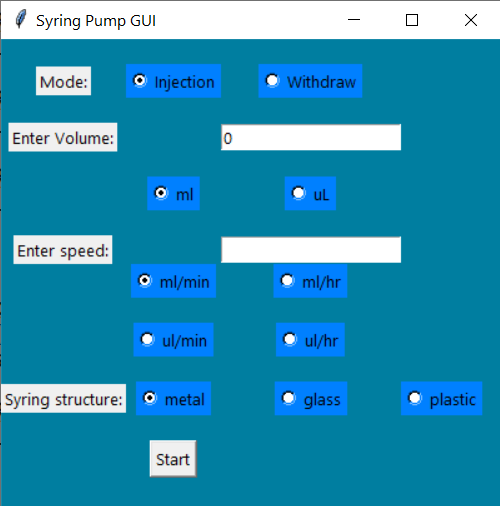
What the GUI asks you
- ModeTwo states: inject, or withdraw the volume inside the syringe.
- VolumeType the amount and pick the unit, mL or uL.
- SpeedFour options: ml/min, ml/hr, uL/min, uL/hr.
- Syringe typeMetal, glass or plastic.
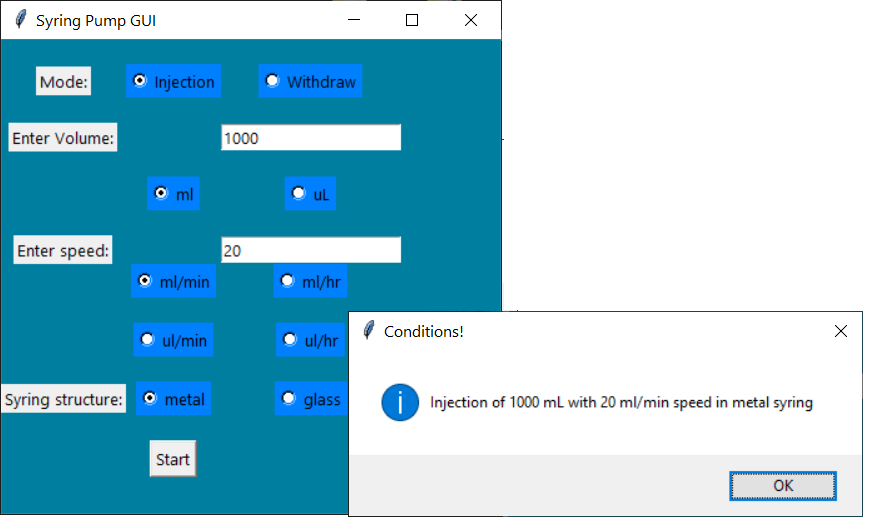
So I pick 1000 mL to inject, at 20 ml/min, with a metal syringe. Those numbers go to the Arduino, which drives the servo motors that move the syringe.
The GUI is Python 3 and the code is on GitHub.
from tkinter import *
import tkinter.messagebox
from tkinter import filedialog


def gett():
    if selected.get()==0:
        str1='Injection '
    else:
        str1='Withdraw '

    str2=str1+"of "+ E1.get()

    if volumeindex.get()==0:
        str3=" mL "
    else:
        str3=" uL "

    str4=str2 + str3

    str5=str4+"with "+ E2.get()

    if speed.get()==0:
        str6=" ml/min"
    elif speed.get()==1:
        str6=" ml/hr"
    elif speed.get()==2:
        str6=" uL/min"
    else:
        str6=" uL/hr"

    str7=str5+str6+ " speed"

    if typeGlass.get()==0:
        str8=" metal"
    elif typeGlass.get()==1:
        str8=" glass"
    else:
        str8=" plastic"

    str9= str7+" in" + str8+" syring"

    tkinter.messagebox.showinfo("Conditions!", str9)

win = Tk()
win.configure(bg="#007EA0")
win.title("Syring Pump GUI")
win.geometry('400x420')

L1 = Label(win, text="Mode:", fg="black")
L1.grid(column=0, row=0)


selected = IntVar()
rad1 = Radiobutton(win,text='Injection', value=0, variable=selected,bg="#0080FF", fg="black")
rad1.grid(column=1, row=0)

rad2 = Radiobutton(win,text='Withdraw', value=1, variable=selected,bg="#0080FF", fg="black")
rad2.grid(column=2, row=0,padx=10, pady=20)


volume = IntVar()
L2 = Label(win, text="Enter Volume:", fg="black")
L2.grid(column=0, row=1)


E1 = Entry(win, textvariable=volume)
E1.grid(column=2, row=1)


volumeindex = IntVar()
rad3 = Radiobutton(win,text='ml', value=0, variable=volumeindex,bg="#0080FF", fg="black")
rad3.grid(column=1, row=2)

rad4 = Radiobutton(win,text='uL', value=1, variable=volumeindex,bg="#0080FF", fg="black")
rad4.grid(column=2, row=2,padx=10, pady=20)


L4 = Label(win, text="Enter speed:", fg="black")
L4.grid(column=0, row=3)


E2 = Entry(win)
E2.grid(column=2, row=3)

speed = IntVar()

rad5 = Radiobutton(win,text='ml/min', value=0, variable=speed,bg="#0080FF", fg="black")
rad5.grid(column=1, row=4)

rad6 = Radiobutton(win,text='ml/hr', value=1, variable=speed,bg="#0080FF", fg="black")
rad6.grid(column=2, row=4)

rad7 = Radiobutton(win,text='ul/min', value=2, variable=speed,bg="#0080FF", fg="black")
rad7.grid(column=1, row=5)

rad8 = Radiobutton(win,text='ul/hr', value=3, variable=speed,bg="#0080FF", fg="black")
rad8.grid(column=2, row=5,padx=1, pady=20)


L6 = Label(win, text="Syring structure:", fg="black")
L6.grid(column=0, row=6)
typeGlass = IntVar()

rad9 = Radiobutton(win,text='metal', value=0, variable=typeGlass,bg="#0080FF", fg="black")
rad9.grid(column=1, row=6)

rad10 = Radiobutton(win,text='glass', value=1, variable=typeGlass,bg="#0080FF", fg="black")
rad10.grid(column=2, row=6)

rad11 = Radiobutton(win,text='plastic', value=2, variable=typeGlass,bg="#0080FF", fg="black")
rad11.grid(column=3, row=6)

b1 = Button(win, text = 'Start',  command=gett)
b1.grid(column=1, row=7,padx=10, pady=20)

L9 = Label(win, text="Developed by Reza Amini", fg="black")
L9.grid(column=1, row=8)
L10 = Label(win, text="imreza.ir", fg="black")
L10.grid(column=1, row=9)


win.mainloop()
related